GitHub Pull Request Security: Complete Guide (2026)
GitHub pull request security guide covering secrets detection, PR security checks, branch protection rules, CodeQL, and automated security scanning. Learn how to secure pull requests before code reaches production.
Pull requests are one of the most important security checkpoints in modern software development.
Every feature, bug fix, infrastructure change, and dependency update typically passes through a pull request before reaching production. That makes pull requests the ideal place to identify security risks before they become incidents.
A single overlooked line can expose API keys, introduce cross-site scripting vulnerabilities, leak sensitive data, or create security weaknesses that remain unnoticed for months.
The challenge is that manual reviews are not always enough.
Reviewers naturally focus on functionality, architecture, and business requirements. Security issues are often hidden inside dozens or hundreds of changed lines, making them easy to miss during a standard code review.
This guide explains how GitHub pull request security works, the risks teams commonly face, GitHub's built-in security features, and how automated pull request security reviews can help prevent vulnerabilities from reaching production.
What Is GitHub Pull Request Security?
GitHub pull request security is the process of identifying security risks before code is merged into a repository.
This can include:
- Manual code reviews
- Automated security scanning
- Secret detection
- Branch protection rules
- Required status checks
- Dependency vulnerability monitoring
- Static analysis The goal is simple:
Find security problems while the code is still inside the pull request.
Fixing a vulnerability before merge is dramatically easier and less expensive than discovering it after deployment.
A strong pull request security process combines human review with automated checks that run on every proposed change.
Why Security Issues Reach Production
Most security issues do not reach production because teams ignore security.
They reach production because reviewers are human.
Large Pull Requests
Reviewing hundreds of changed lines makes it difficult to identify individual security risks.
The larger a pull request becomes, the easier it is for dangerous code to hide inside legitimate changes.
Review Fatigue
Developers reviewing multiple pull requests every day naturally prioritise functionality and business logic.
Small security issues can be overlooked even by experienced engineers.
Time Pressure
Release deadlines often encourage faster reviews.
When teams are rushing to merge changes, security validation can become inconsistent.
Inconsistent Standards
Different reviewers look for different things.
One developer may immediately notice a hardcoded token while another focuses entirely on application logic.
Automated checks help create consistency across every pull request.
Security Risks Commonly Found in Pull Requests
The following issues are frequently detected during pull request security reviews.
Risk| Severity| Example API Keys| Critical| Stripe keys, OpenAI keys GitHub Tokens| Critical| ghp_xxxxxxxxx JWT Tokens| Critical| Hardcoded authentication tokens eval() Usage| Critical| Dynamic code execution Unsafe innerHTML| High| Cross-site scripting risk Debugger Statements| Medium| Debug code accidentally committed Console Logs| Low| Potential information leakage
These patterns can often be detected automatically before a reviewer even opens the pull request.
GitHub Security Features Built Into GitHub
GitHub provides several security tools that help identify risks throughout the development lifecycle.
Pull Request Reviews
GitHub's review system allows team members to inspect code before merge.
Reviewers can approve changes, request modifications, and leave comments directly on affected lines.
Branch Protection Rules
Branch protection rules prevent changes from being merged unless specific requirements are met.
Examples include:
- Required reviews
- Required status checks
- Restricted branch access
- Linear history requirements
Dependabot
Dependabot identifies known vulnerabilities in project dependencies and automatically proposes updates when fixes become available.
Secret Scanning
GitHub can detect many exposed credentials and secrets stored within repositories.
CodeQL
CodeQL performs static analysis to identify potential vulnerabilities and coding mistakes.
These tools provide a strong security foundation.
However, many teams also require pull-request-specific policies focused exclusively on newly introduced code.
Why Diff-Based Security Scanning Matters
Traditional scanners often analyse entire repositories.
While useful, repository-wide scanning frequently generates large numbers of findings, including historical issues developers are not actively modifying.
Diff-based scanning focuses only on newly added code.
Benefits include:
- Faster scan times
- More relevant findings
- Reduced noise
- Faster remediation
- Immediate developer feedback Instead of reviewing thousands of existing files, developers receive feedback only on the changes they are proposing.
How Automated Pull Request Security Reviews Work
A typical automated security review follows this workflow:
- A developer opens a pull request.
- GitHub sends a webhook event.
- The scanner retrieves the pull request diff.
- Added lines are analyzed against security rules.
- Violations are classified by severity.
- A status check is published to GitHub.
- Results are posted back to the pull request. This creates a security review process that runs automatically on every pull request.
Example Security Finding
Consider the following code added to a pull request:
const apiKey = "sk_live_123456789";
An automated security scanner may report:
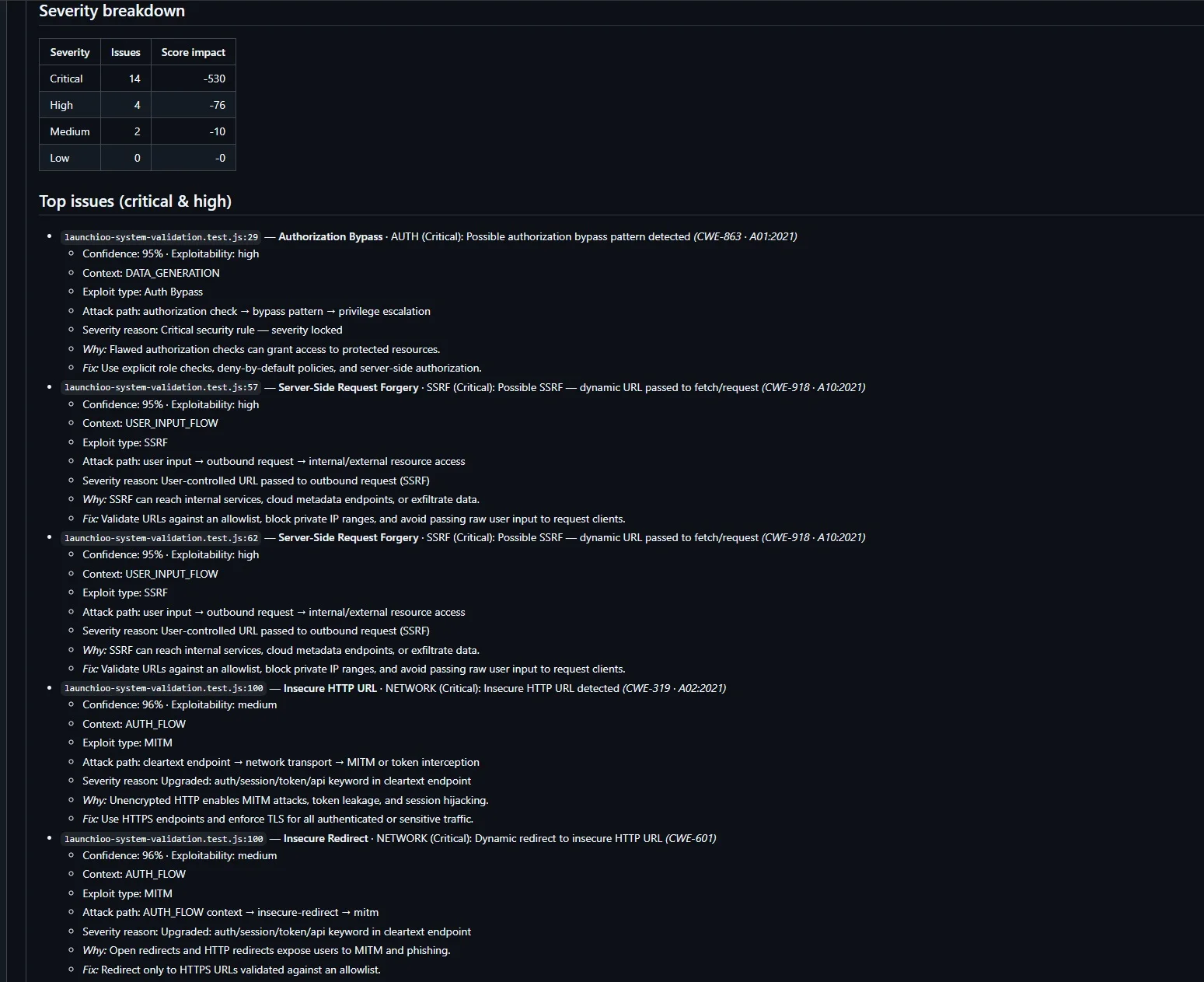
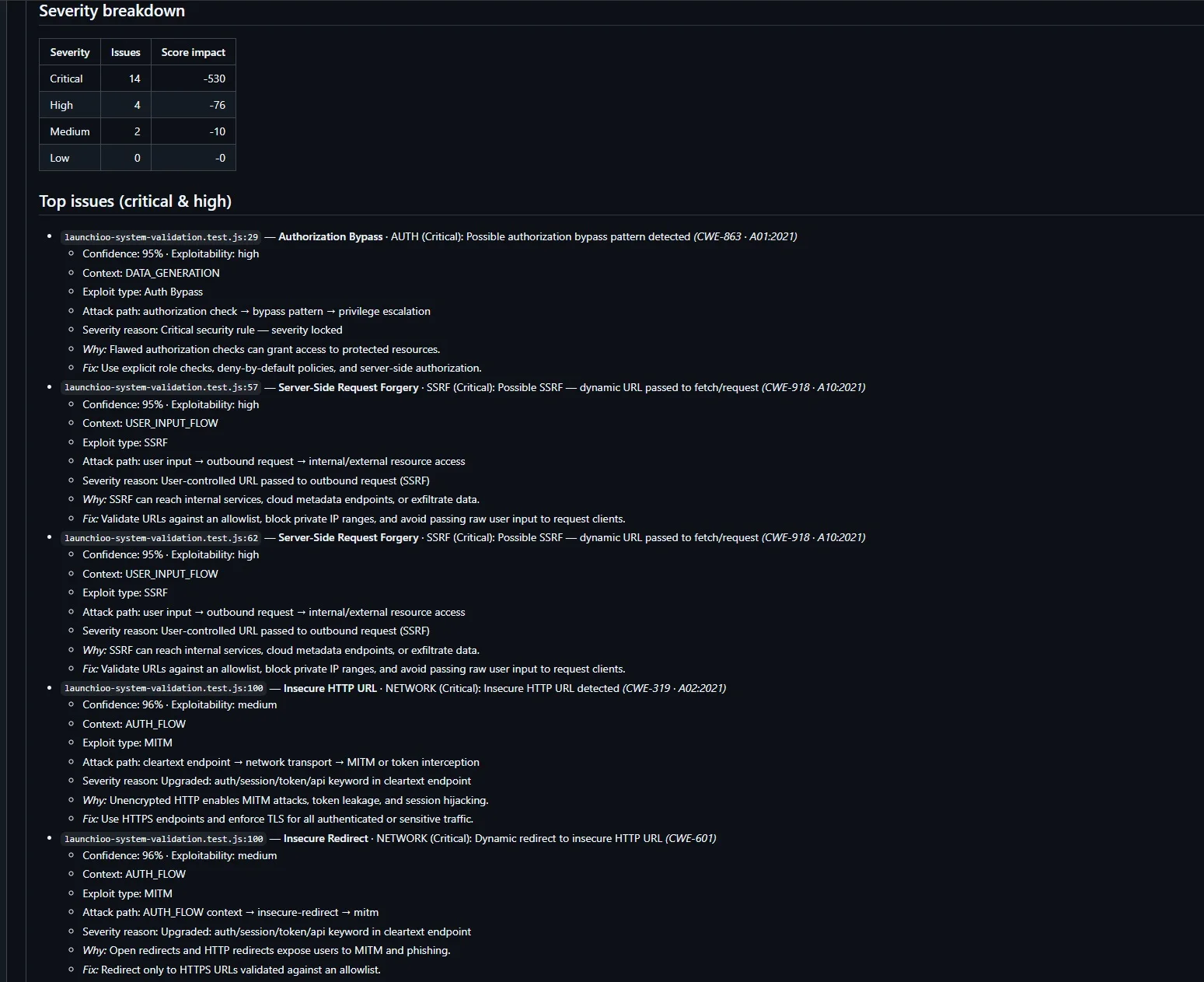
Critical api-key: Possible hardcoded API key detected
Security Score: 88/100 Policy Result: FAIL
The issue can then be fixed before the code reaches production.
This reduces the risk of credential exposure and avoids costly remediation later.
GitHub Security Tools Compared
Different security tools solve different problems.
Tool| Pull Request Scanning| Secret Detection| Check Runs| Dashboard GitHub Secret Scanning| Partial| Yes| No| No GitHub CodeQL| Yes| No| Yes| Limited Dependabot| Dependency-focused| No| Yes| No Launchioo| Yes| Yes| Yes| Yes
GitHub's built-in tooling provides excellent coverage for dependency vulnerabilities, static analysis, and known secret patterns.
Additional pull-request-focused security tools can provide custom policy enforcement and security checks tailored to a team's workflow.
How Launchioo Reviews Pull Requests
Launchioo is designed specifically for GitHub pull request security.
Rather than scanning entire repositories, Launchioo focuses on newly added lines within pull requests.
When a pull request is opened or updated:
- Launchioo receives the GitHub event.
- The pull request diff is downloaded.
- Added lines are extracted.
- Security rules are executed.
- Violations are assigned severities.
- A security score is calculated.
- A GitHub Check Run is published.
- Results are saved to the Launchioo dashboard. Developers receive feedback directly inside GitHub without changing their workflow.
Customising Security Policies
Launchioo supports repository-level configuration through a "launchioo.yml" file.
Example:
severityOverrides: console-log: off debugger: low
- ignoredRules:
jwt-token failOn:
- critical This allows teams to customise policies without modifying application code.
Security requirements often differ between repositories, and configurable policies provide greater flexibility while maintaining consistent enforcement.
GitHub Check Runs and Merge Protection
GitHub Check Runs provide a native way to display security results directly inside pull requests.
A check run can:
- Pass
- Warn
- Fail Repositories can then use branch protection rules to require successful checks before merging.
This allows security policies to become part of the normal development workflow.
Developers see the same familiar green ticks and red crosses used by continuous integration pipelines.
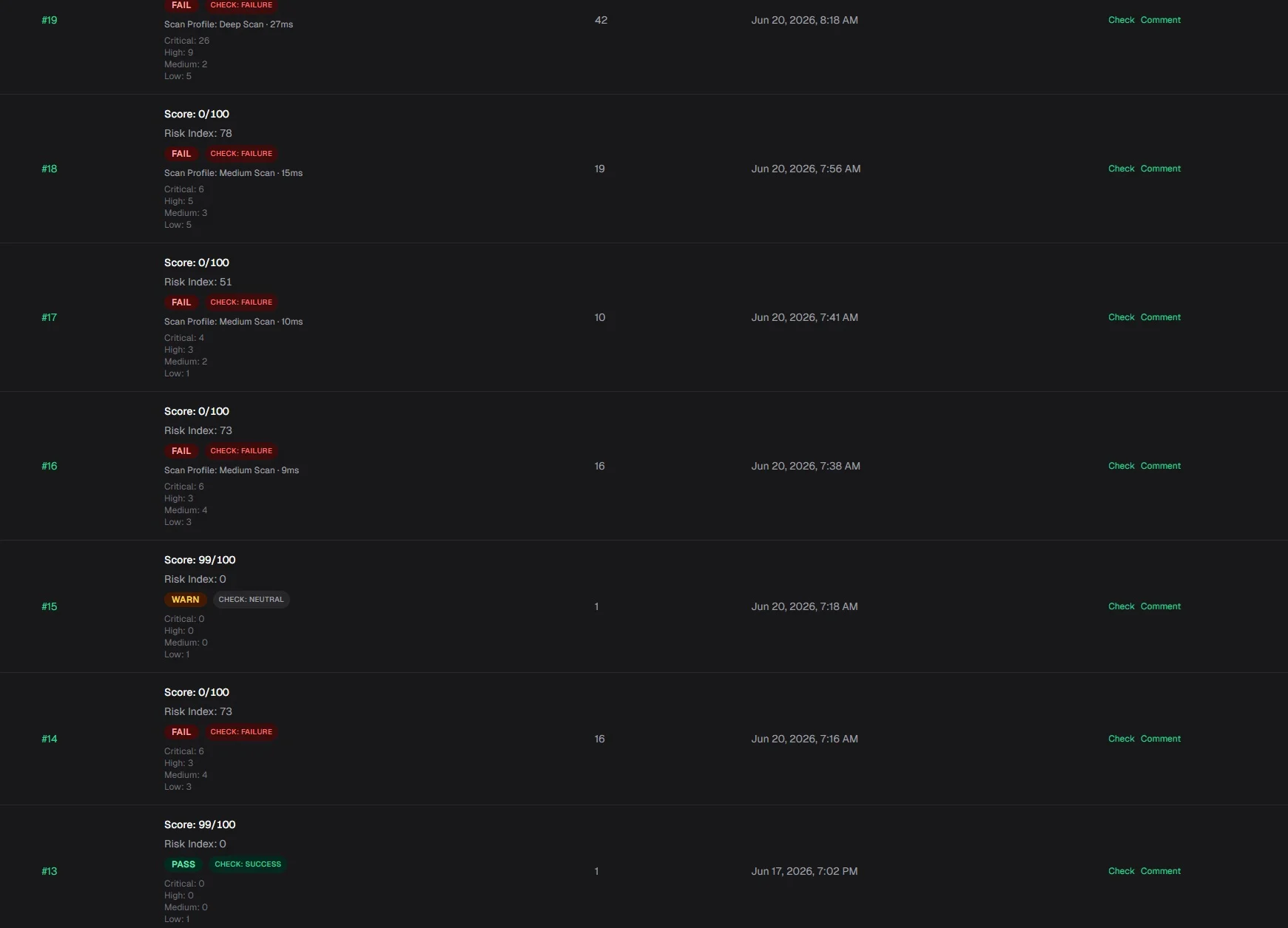
Security History and Reporting
Security reviews become significantly more valuable when results are stored over time.
Launchioo records:
- Pull request number
- Repository
- Commit SHA
- Security score
- Risk index
- Severity breakdown
- Violation details
- Check Run links
- Pull request comment links This provides a historical view of security activity across connected repositories.
Teams can identify recurring issues, compare repositories, and monitor security improvements over time.
Pull Request Security Checklist
Before merging a pull request, verify the following:
- No hardcoded API keys
- No GitHub tokens
- No JWT secrets
- No unsafe eval() usage
- No dangerous innerHTML assignments
- No leftover debugger statements
- No sensitive information in logs
- Required status checks enabled
- Branch protection rules configured
- Security findings reviewed Following this checklist significantly reduces the likelihood of introducing preventable security issues.
Frequently Asked Questions
Frequently Asked Questions
Yes.
Branch protection rules can require successful status checks before code can be merged.
What is a GitHub Check Run?
A Check Run is a status reported back to GitHub by an application or integration.
Check Runs appear directly inside pull requests and commits.
Does GitHub scan pull requests automatically?
GitHub provides several security tools, including CodeQL, Dependabot, and Secret Scanning.
Additional GitHub Apps can provide pull-request-focused scanning and custom policy enforcement.
What is diff-based security scanning?
Diff-based scanning analyses only newly added code rather than the entire repository.
This reduces noise and focuses developer attention on the current pull request.
What is the benefit of automated pull request reviews?
Automated reviews provide consistent security validation on every pull request and help identify issues before they are merged.
Final Thoughts
Pull requests represent one of the most effective places to enforce security standards.
The earlier vulnerabilities are identified, the cheaper they are to fix and the less likely they are to become incidents.
GitHub provides a strong foundation through pull request reviews, branch protection, CodeQL, Dependabot, and Secret Scanning.
Additional pull-request-focused security checks can help teams identify newly introduced risks before they are merged.
Launchioo integrates directly with GitHub pull requests, scans newly added code, publishes GitHub Check Runs, and maintains a cross-repository history of security reviews inside a dedicated dashboard.
If your team relies on GitHub pull requests every day, security reviews should be part of every merge decision.
Try Launchioo on your repositories
Install the GitHub App and get automated pull request security reviews in minutes.