What Is SSRF? How to Detect Server-Side Request Forgery in GitHub Pull Requests
Learn what SSRF is, how attackers exploit it, and how to detect SSRF vulnerabilities before they reach production using GitHub pull request security scanning with Launchioo.
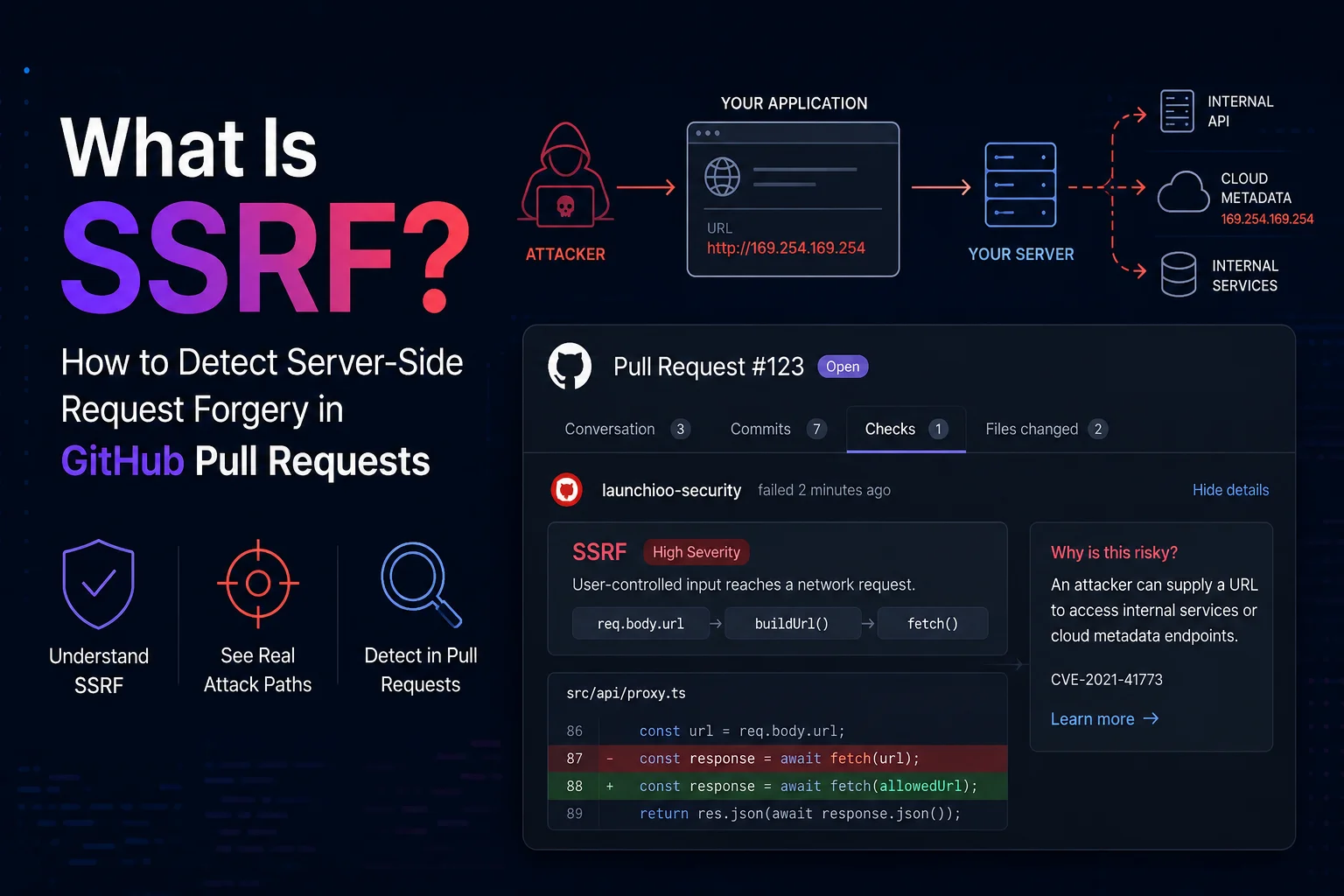
What Is SSRF? How to Detect It in GitHub Pull Requests
Server-Side Request Forgery (SSRF) has quietly become one of the most dangerous web application vulnerabilities. Unlike many security issues that require complicated attack chains, SSRF often starts with something that looks completely harmless: allowing a user to provide a URL.
To read up on GitHub Pull Request Security: Complete Guide
If that URL is not validated correctly, an attacker may be able to make your own server perform requests on their behalf.
Instead of attacking your application directly, they convince your application to attack something else.
That "something else" might be:
-
Internal APIs
-
Private microservices
-
Cloud metadata endpoints
-
Kubernetes services
-
Redis instances
-
Elasticsearch clusters
-
Admin panels
-
Internal dashboards
Modern applications communicate with dozens of internal services every second. An SSRF vulnerability can turn that trusted communication into an attack path.
The good news is that many SSRF vulnerabilities are introduced during normal feature development and can be detected before they are merged into your repository.
That's exactly where pull request security scanning becomes valuable.
Launchioo analyzes every pull request for dangerous request patterns, untrusted input flowing into network requests, exploit chains and related security issues before the code reaches your main branch.
What Is SSRF?
Server-Side Request Forgery is a vulnerability that allows an attacker to control requests made by your server.
Normally the flow looks like this:
User
▼
Application
▼
External API
With SSRF, the attacker changes the destination.
Attacker
▼
Application
▼
Internal Network
Your server performs the request because it trusts itself.
Firewalls, VPNs and private networks no longer protect the target because the request originates from inside your infrastructure.
This is why SSRF can be extremely serious even when there appears to be no direct access to internal systems.
A Simple Vulnerable Example
Imagine you're building an image preview feature.
Users paste an image URL and your application downloads it.
app.post("/preview", async (req, res) => {
    const response = await fetch(req.body.url);

    const image = await response.arrayBuffer();

    res.send(image);
 });
From a functionality perspective, this looks perfectly reasonable.
The problem is that any URL can now be requested.
Instead of supplying an image URL, an attacker submits:
http://127.0.0.1:8080/admin
or
http://169.254.169.254/latest/meta-data/
Your application happily makes the request.
The attacker never had access to those systems directly.
Your server did.
Why Cloud Metadata Endpoints Matter
One of the most common SSRF targets is the cloud metadata service.
Cloud providers expose metadata to running virtual machines.
Examples include:
- Instance information
- Temporary access tokens
- IAM credentials
- Service account permissions
- Network configuration
These endpoints are intentionally inaccessible from the public internet.
Only the running instance can access them.
For AWS, the metadata endpoint is:
http://169.254.169.254/latest/meta-data/
If an attacker can force your application to request that address, they may retrieve temporary credentials that allow them to access cloud resources.
This type of attack has been involved in several high-profile security incidents over the last decade.
SSRF Doesn't Always Look Obvious
One reason SSRF remains common is that developers rarely write code that obviously says:
"Allow attackers to access internal services."
Instead, vulnerabilities appear inside legitimate features.
Examples include:
- URL preview services
- Webhook testing tools
- Image downloaders
- PDF generators
- Screenshot services
- File import tools
- RSS readers
- Open Graph preview generators
- Avatar import features
- Remote backup utilities
Each of these features needs to fetch a remote resource.
The vulnerability comes from who controls the destination.
If user input reaches the network request without proper validation, an attacker may gain control of where your server connects.
Why Pull Requests Are the Best Time to Catch SSRF
Most security tools run after code has already been merged.
That means developers have to:
- create another branch
- fix the issue
- open another pull request
- wait for another review
- deploy again
Finding security problems late increases both cost and frustration.
Scanning pull requests changes that workflow.
Instead of discovering the problem after deployment, developers see the issue while reviewing the code they have just written.
That makes fixes significantly faster because the implementation is still fresh in the developer's mind.
Launchioo scans every pull request before merge, looking for SSRF patterns including:
- User-controlled URLs passed into
fetch() - Dynamic Axios requests
http.request()https.request()WebSocketconnections- Open redirect chains
- Internal IP access
- Cloud metadata endpoints
- URL concatenation
- Dangerous protocol usage
Rather than simply matching keywords, Launchioo also performs lightweight taint tracking to determine whether untrusted input flows into a network sink.
That helps reduce noise while surfacing issues that deserve attention.
Real-World SSRF Examples
SSRF vulnerabilities rarely arrive as obvious security mistakes.
Most begin life as perfectly reasonable features added during everyday development.
A developer is asked to build a webhook tester.
Someone adds URL previews to improve the user experience.
An image upload feature gains support for importing files from remote URLs.
Everything works exactly as intended.
Until someone supplies a URL the developer never expected.
Example 1 — Image Import
Consider a feature that imports a user's profile picture from a URL.
app.post("/avatar", async (req, res) => {
    const response = await fetch(req.body.imageUrl);

    const image = await response.arrayBuffer();

    saveAvatar(image);
});
At first glance nothing appears suspicious.
The application downloads an image and stores it.
The problem is that the server trusts whatever URL the user supplies.
Instead of providing:
https://example.com/avatar.png
an attacker submits:
http://127.0.0.1:3000/admin
or
http://169.254.169.254/latest/meta-data/
Your application happily makes the request because it has no idea the destination is dangerous.
Example 2 — Webhook Testing
Many SaaS products allow customers to test outgoing webhooks.
Developers often write something similar to:
await fetch(req.body.webhookUrl, { method: "POST", body: JSON.stringify(payload) });
Again, nothing looks particularly dangerous.
But the attacker controls:
req.body.webhookUrl
That means your infrastructure can now be instructed to send HTTP requests anywhere it can reach.
Without validation, that includes:
- localhost services
- Docker containers
- Kubernetes APIs
- internal dashboards
- cloud metadata services
Example 3 — PDF Generation
Another common example looks like this.
const browser = await chromium.launch(); await page.goto(req.body.url); await page.pdf();
The goal is to generate PDFs from websites.
Instead, an attacker submits:
http://internal-api/
The headless browser loads an internal application that should never be reachable from outside your network.
These are exactly the kinds of features that regularly introduce SSRF vulnerabilities.
Why Developers Miss SSRF During Code Review
Most pull request reviews focus on functionality.
Reviewers ask questions like:
- Does the feature work?
- Does it pass tests?
- Is the code readable?
- Is the architecture consistent?
Security often becomes a secondary concern.
Consider this pull request.
+ const response = await fetch(req.body.url);
A reviewer sees one line.
They think:
"Looks fine."
What they don't immediately see is the flow behind that line.
User Input
▼
req.body.url
▼
fetch()
▼
Server makes request
That single line introduced a completely new attack surface.
Nothing about the syntax itself looks unusual.
This is why SSRF is frequently missed during manual reviews.
Why Simple Pattern Matching Isn't Enough
Many scanners detect SSRF by searching for calls like:
fetch(...)
or
axios(...)
Unfortunately, that creates two problems.
Too Many False Positives
Every HTTP request becomes a warning.
Even code like this gets flagged:
fetch("https://api.stripe.com");
There is no vulnerability here.
The destination is fixed.
No user controls it.
Yet a basic scanner reports it anyway.
Developers quickly learn to ignore these warnings.
Dangerous Cases Can Be Missed
Now consider this code.
const endpoint = buildUrl( sanitizeInput(req.body.host), "/api" ); fetch(endpoint);
A regular expression sees:
fetch(endpoint)
It has no idea where endpoint came from.
The dangerous flow happened several lines earlier.
Without understanding the data flow, many scanners simply cannot determine whether the request is safe.
This Is Where Taint Flow Analysis Matters
Instead of looking only at the network request itself, Launchioo follows the data.
Imagine this simplified flow.
req.body.url

▼

validateUrl()

▼

buildRequest()

▼

fetch()
Launchioo tracks that chain.
If untrusted input reaches a network sink without appropriate protection, the finding is raised with context.
Instead of saying:
"fetch() detected"
the report becomes much more useful.
Source:
req.body.url

Transformation:
buildRequest()

Sink:
fetch()

Risk:
Potential SSRF
Developers immediately understand both where the data entered the application and where it became dangerous.
That dramatically reduces investigation time.
Exploit Chains Tell the Bigger Story
Sometimes SSRF is only one step in a much larger attack.
Imagine a pull request introduces the following flow.
req.body.target

▼

fetch()

▼

Internal API

▼

Response returned

▼

Sensitive data logged
Individually, none of those steps may appear critical.
Together they form an exploit chain.
Launchioo's exploit chain engine links related findings together so reviewers can understand the complete attack path instead of isolated warnings.
Rather than seeing four disconnected findings, the reviewer sees a single narrative explaining how an attacker could move from user-controlled input to sensitive internal data.
That context helps teams prioritize issues that present genuine risk rather than simply counting warnings.
Detecting SSRF Before Merge
Finding SSRF after deployment usually means:
- creating another branch
- writing a fix
- opening another pull request
- waiting for review
- redeploying
Finding it inside the pull request avoids that entire cycle.
Launchioo analyses every pull request before merge, looking for patterns including:
- User-controlled URLs reaching
fetch() - Dynamic Axios requests
http.request()andhttps.request()- WebSocket connections
- Open redirect chains
- Requests to private IP ranges
- Cloud metadata endpoints
- Dynamic URL construction
- Source-to-sink taint flow
- Cross-file exploit chains
Instead of producing hundreds of generic warnings, findings include the affected file, line number, exploit type, confidence level and attack path so developers can understand why the issue matters and fix it before the code reaches production.
Try Launchioo on your repositories
Install the GitHub App and get automated pull request security reviews in minutes.